Fast, Simple JPEG Resizing Without the Bloat
Resize JPEGs is a simple, easy-to-use photo resizing utility that does one thing and does it well. There is no image conversion, rotation, grayscale, thumbnailing, watermarking, color correction, or filtering here -- just fast, reliable JPEG resizing. Whether you need to shrink a single photo for an email or batch resize an entire directory tree, Resize JPEGs handles it quickly and without unnecessary complexity.
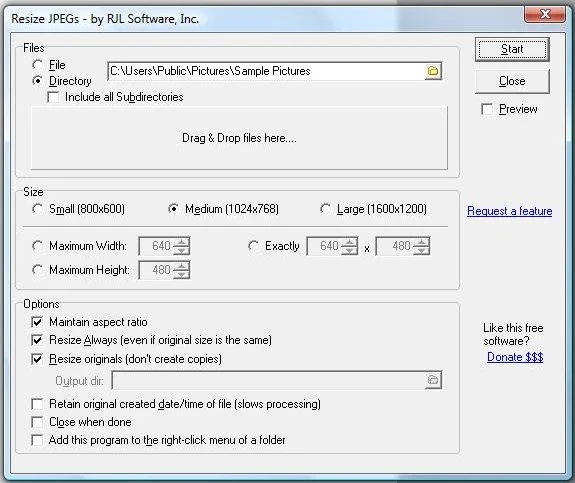
The application is fully featured despite its focused scope. Choose from standard preset sizes or enter any custom width and height. Resize your original files in place or create smaller copies in a separate output directory. Drag and drop JPEG files directly into the application window, or right-click any folder in Windows Explorer to resize all the JPEGs inside it. A built-in preview lets you watch images as they are processed, and full command-line support makes it easy to automate batch operations from scripts or scheduled tasks.
When processing completes, Resize JPEGs displays a summary with the number of files found, matched, and resized -- along with detailed performance statistics showing exactly how long the operation took, down to the millisecond. All of your preferences are remembered between sessions, so the next time you run Resize JPEGs it picks up right where you left off. It is an excellent tool for preparing photos for email, web publishing, reports, and presentations.
Who Is This For?
- Photographers -- Batch resize entire shoots for web galleries, email delivery, or social media without opening a full image editor.
- Web developers -- Quickly optimize directories of JPEG images for faster page loads and reduced bandwidth consumption.
- Business users -- Resize photos for reports, presentations, and documents without learning complex image editing software.
- Anyone -- Who needs to quickly shrink JPEG photos for email, storage, or sharing.
Key Features
Batch Processing
Resize entire directories and subdirectories of JPEG images at once. Process hundreds of photos in a single operation with real-time progress tracking.
Custom Sizes
Choose from standard preset dimensions or enter any custom width and height. Set maximum width, maximum height, or exact dimensions with aspect ratio preservation.
Preserve Originals
Create resized copies in a separate output directory to keep your originals untouched, or resize the original files in place when you want to reclaim disk space.
Drag and Drop
Drag JPEG files or folders directly into the application window. No need to browse through file dialogs -- just drop and resize.
Explorer Integration
Right-click any folder in Windows Explorer to resize all JPEG images inside it. Seamless integration means Resize JPEGs is always one click away.
Performance Stats
See exactly how long the resize operation took, down to the millisecond. Compare compression speed against other tools and verify that every file was processed.
Command Line Options
Resize JPEGs has full support for command-line options. Everything you can do in the user interface you can do via the command line:
resizejpegs.exe [options]
  -f "[file]"       Single file to resize
  -d "[directory]"  Directory to resize
  -x [max width]    Maximum width in pixels
  -y [max height]   Maximum height in pixels
  -r                Resize originals (instead of copies)
  -a                Always resize (even if smaller)
  -c                Close when done
  -p                Show preview
  -s                Include subdirectories
  -e                Retain original file date
  -o "[path]"       Output directory for resized copies
  -t                Maintain aspect ratio
Example:
resizejpegs.exe -d "c:\my photos\" -r -a -c -x 1600 -e
This loads all JPEG files from the "c:\my photos" directory, resizes the originals in place, always resizes even if already smaller, closes when done, sets a maximum width of 1600 pixels, and retains the original file date and time.
Windows Support
 Win 11
 Win 10
 Win 8
Win 8
 Win 7
Win 7
 Vista
Vista
 XP
XP
 Win 2k
 NT
NT
 ME
ME
 98
98
 95
95
Download Resize JPEGs
















 Download v1.01
 Give Now