|
|
Manage Windows Startup Programs via the Registry
WinStartup allows you to add or remove programs that are executed upon startup of Windows. Adding programs through WinStartup is completely hidden from the Start Menu Startup group, making it ideal for system administrators and power users who need startup entries that are not visible to end users.
WinStartup works directly with the Windows registry Run and RunOnce keys. It includes full command line support, so you can add programs that require specific command line options to launch correctly. View, add, edit, and delete startup entries from a simple interface.
Who Is This For?
- System administrators -- Deploy startup programs across workstations via registry entries, hidden from the Start Menu Startup group.
- Power users -- Manage which programs launch at Windows startup without editing the registry manually.
- Security-conscious users -- Review and control what runs at startup, including entries not visible in the Start Menu.
- Script developers -- Add command-line programs with specific arguments to the Windows startup sequence.
Key Features
Registry-Based Startup
Adds programs to the Windows registry Run and RunOnce keys. Entries are hidden from the Start Menu Startup group.
View and Manage Entries
View all current startup registry entries in one place. Add, edit, or delete entries through a simple graphical interface.
Command Line Support
Supports programs that require command line arguments to run. Specify full command-line options when adding a startup entry.
Hidden from Start Menu
Programs added through WinStartup do not appear in the Start Menu Startup group, keeping the startup configuration clean and discreet.
Edit Existing Entries
Modify the path, arguments, or name of any existing startup registry entry without needing to open RegEdit.
Fully Portable -- Zero Installation
No Installation Required Runs directly from an .exe file. No setup wizard, no "Next, Next, Finish."
Runs From USB Copy to a flash drive and use on any PC. IT techs carry these on a keychain for on-site support.
Leaves No Trace No files left behind after use. Delete the folder and it is gone completely.
No Registry Changes Does not modify the Windows registry, system settings, or install drivers.
Self-Contained Everything the program needs lives in its own folder. No scattered DLLs or AppData clutter.
No Admin Rights Needed Runs under standard user accounts. No UAC prompts, no IT ticket required.
Lightweight Tiny footprint, typically under 1 MB. No frameworks, runtimes, or bloated dependencies.
Instant Startup Launches in under a second. No splash screens, no loading bars, no waiting.
Tips
- How to close WinStartup -- Choose File - Exit from the main menu.
Windows Compatibility
Win 11
Win 10
Win 8
Win 7
Vista
XP
Win 2k
NT
ME
98
95
Download WinStartup
Screenshots
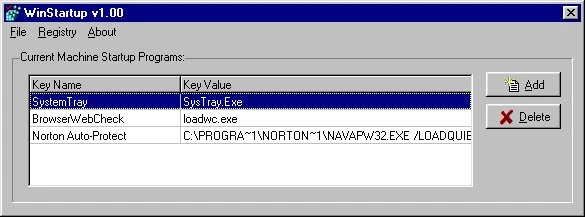
Main screen where you can view, add, edit, and delete Windows startup registry entries.
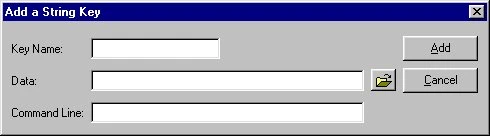
Add or edit command-line programs to be launched at Windows startup, including full command-line argument support.
What Users Are Saying
★★★★★
"Shows every startup entry including ones hidden from msconfig. Great for cleaning up a slow boot."
-- Frank L., Power User
★★★★★
"Simple and effective. We use it to manage startup entries on workstations across the office."
-- Diane E., IT Support
Download WinStartup
Windows 11, 10, 8, 7, Vista, XP, 2000, NT, ME, 98, 95
162 KB
SHA256: 6b5a58f851f5...8d88
Freeware
Updated: July 1, 1998
You Might Also Like
Command-line utility that shuts down, restarts, logs off, or powers off Windows. Works in login scripts and batch files.
Learn More

Command-line utility that delays program launches by a specified number of seconds. Set wait time, file path, and window state.
Learn More
Support WinStartup Development
WinStartup is completely free. If this tool has saved you time, consider making a donation to help fund continued development and new features.
Support and Information
Frequently Asked Questions
Find answers to common questions about WinStartup.
View FAQ
Need Help?
Found a bug or have a question? We are here to help.
Contact Us
Uninstall
To uninstall, simply delete the program folder. No registry entries or system files are left behind.
How to Update
Download the latest version and extract over your existing folder, or to a new location. Settings are preserved.
Privacy: This software does not collect, transmit, or store any personal data. No internet connection required.
End-User License Agreement (EULA)
|
|
|