

Log Info v3.00 - PC Inventory and Audit Tool
Automatically collect hardware and system data from every Windows computer on your network
Effortless PC Inventory and Asset Management
Managing IT assets across a network does not have to be complicated. Log Info is a powerful yet simple utility that streamlines hardware and system inventory by automatically collecting detailed information from networked computers. With a single line in a login script or remote execution over the network, you can retrieve critical system data instantly -- no manual tracking, no complex agents, and no heavyweight software to install.
Log Info runs silently during login, gathers the exact data you specify, and writes it to a shared CSV file that you can import directly into Excel, SQL Server, or any enterprise database. Whether you are budgeting for hardware refreshes, tracking software compliance, or simply need to know what is running on your network, Log Info delivers the answers in seconds.
Who Is This For?
Key Features
Fully Portable -- Zero Installation





How to Get Started
Advanced Deployment
Log Info supports environment variables in all paths, including the special %CURRENT_DIR% variable that resolves to the directory where loginfo.exe is located. This means you can deploy Log Info to a USB drive or network share without hardcoding UNC paths.
Virtual Machine Detection
Log Info detects VMware, VirtualBox, Citrix, QEMU, Hyper-V, and VirtualPC environments and reports them in the operating system output. Know exactly which machines are physical and which are virtual across your entire network.
Windows Desktop Support
 Win 11
 Win 10
 Win 8
Win 8
 Win 7
Win 7
 Vista
Vista
 XP
XP
 ME
ME
 98
98
 95
95
Windows Server Support
Server 2022
Server 2019
Server 2012
Server 2011
Server 2008 R2
Server 2003
 Server 2000
 NT Server
Screenshots
Configuration Editor
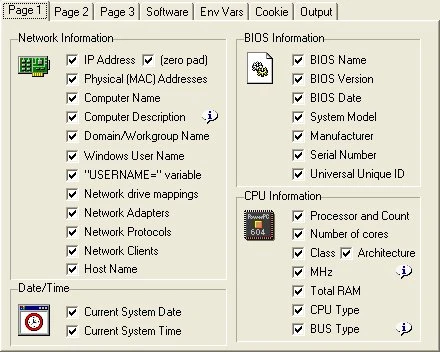
The configuration screen lets you select which information to audit from each client computer. Each configuration is saved to an INI file used by loginfo.exe.
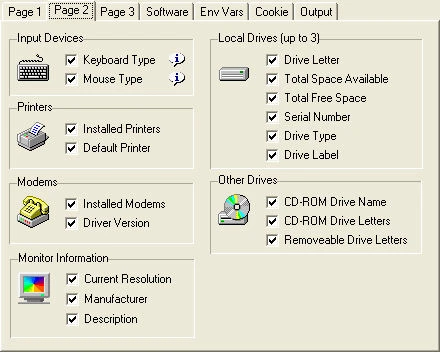
Additional computer information on Page 2. Select the information you want to audit using simple checkboxes.
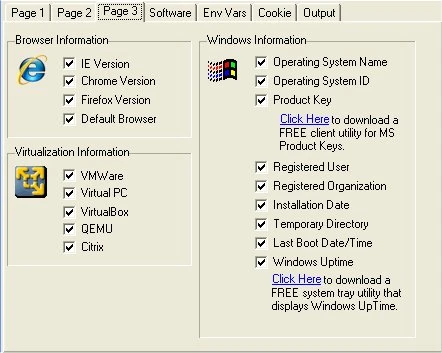
Even more data collection options including Windows system information and virtual machine detection.
Advanced Options
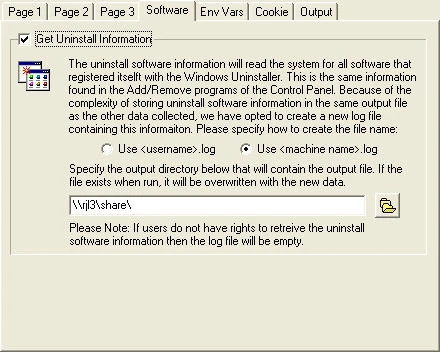
Collect all uninstall software information registered with the Windows uninstaller -- ideal for simple software audits.
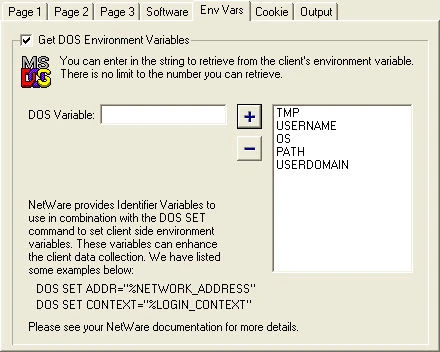
Capture any environment variable from the client machine. Enter the variable name and click Add. NetWare-specific macros are also supported.
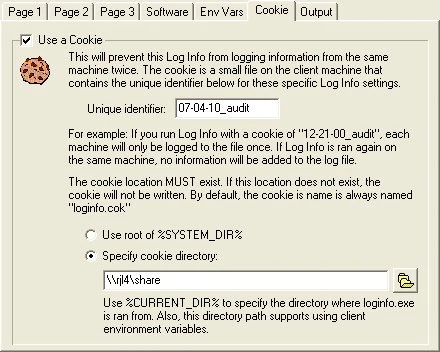
The cookie option prevents duplicate audits by placing a small file on each client machine. If the cookie exists and matches, Log Info skips that machine.
Output and Reports
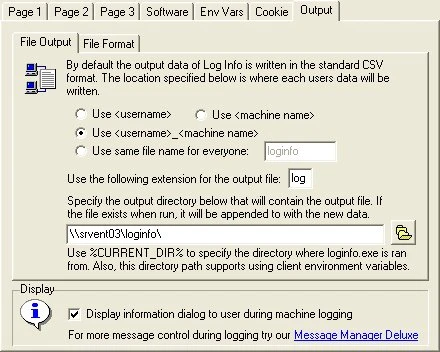
Configure where and how data is saved. Choose shared log files, per-user files, or per-machine files. Set the file extension and output location.
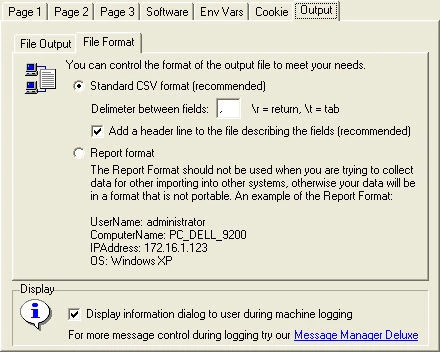
Choose between CSV (with customizable delimiter) for database import or human-readable report format for printing and archiving.
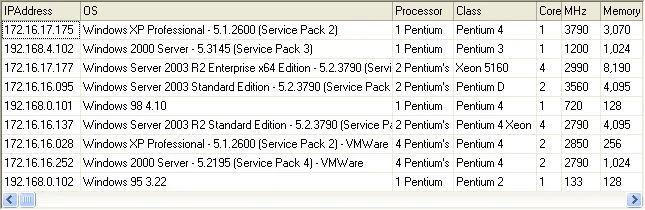
Example of delimited output from Log Info across 4 machines -- ready for import into Excel, SQL Server, or any database system.
Version History
Significant improvements to Operating System detection.
Support for Windows 11 detection.
Added support for Windows Server 2008, 2011, 2012, 2019 and 2022.
Finalized support for Windows 10.
Significant improvements to collection speed (all options: 1 min 45 sec down to 8 seconds).
Initial support for Windows 10.
SMBIOS 2.8 support. Fixed VMware virtual machine detection.
Windows 8.1 product key detection corrected.
Dramatically increased BIOS detection performance.
Updated Uninstall Software to gather Microsoft-specific programs.
Added Google Chrome version detection, corrected Firefox and default browser.
Updated CPU and BIOS detection for latest hardware.
Added support for Windows 8. Corrected Windows 7 and Server 2008 edition detection.
Added Windows 7 support. Added CPU Architecture (x86, x64, WOW64, Itanium). Added Intel i7 processor support.
Added environment variable support to all paths.
Added %CURRENT_DIR% support for portable deployments.
Added Windows Edition to OS name. Added VMware, VirtualServer, and VirtualPC detection.
Added Log Info File Viewer utility.
Added Windows Product Key and installation date detection.
Added Windows uptime and last boot time. Added Firefox browser detection.
Added custom cookie location. Added system model, manufacturer, serial number.
Added monitor information. Added software tab with uninstall software logging.
Increased reliability for 10x users (Enterprise License). Rewrote CSV writing and BIOS handling.
Initial version.
Upgrade Log Info
All licenses include no maintenance agreements, no annual fees, no upgrade fees, and no support fees. Log Info is licensed on a per-server basis -- not per domain or tree.
Single Server License
Allows for unlimited client usage for one server within a single organization. For each copy of Log Info on each server you need one license.
Site License
Allows for unlimited usage on unlimited servers and users in a single building. Perfect for companies deploying Log Info across several servers at one location.
Enterprise License
Allows for unlimited usage on unlimited servers and users at all company locations. Covers your entire organization including remote sites.
Download Log Info
 Download v3.00
You Might Also Like

Listen on TCP ports, view live connections, and test HTTP reachability with this portable Windows network debugging utility.
Learn More
Display how long your Windows system has been running in a customizable, borderless window with tray icon and Always On Top.
Learn MoreSupport Log Info Development
If Log Info has saved you time managing your IT assets, please consider making a contribution or purchasing a license. Your support helps fund future updates.
Support and Information
Find answers to common questions about Log Info.
View FAQFound a bug or have a question? We are here to help.
Contact UsTo uninstall, simply delete the program folder. No registry entries or system files are left behind.
Download the latest version and extract over your existing folder, or to a new location. Settings are preserved.