
Money Meter v1.00 - Meeting Cost Calculator
Track meeting costs in real-time by calculating expense per second based on attendee salaries
See the Real Cost of Every Meeting
Money Meter is a simple utility that was inspired by countless unnecessary corporate meetings -- and is best used for exactly that purpose. Run Money Meter to track the average employee expense, per second, over a given period of time. With a highly configurable user interface, you can resize both the window and the text to determine how bold of a statement you want to make.
To adjust Money Meter's settings, choose Configure from the right-click menu on the main screen. You may change the number of personnel involved, the average salary for those individuals, hours worked per week, and weeks worked per year. Money Meter also sits in your Windows system tray for quick and easy access to all program options, staying out of the way until you need it.
For management and reporting, Money Meter can export the data it collects to a comma-delimited file for importing into Excel or Access. If you forgot to start the timer at the beginning of a meeting, the Quick Edit feature lets you manually enter the elapsed time so you never lose track of the cost.
Who Is This For?
Key Features
Web Version
Need to track meeting costs without installing anything? A browser-based version of Money Meter is available at CostlyMeeting.com. Use it on any device -- desktop, tablet, or phone -- right from your web browser.
Windows Compatibility
 Win 11
 Win 10
 Win 8
Win 8
 Win 7
Win 7
 Vista
Vista
 XP
XP
 Win 2k
 NT
NT
 ME
ME
 98
98
 95
95
Screenshots
Interface
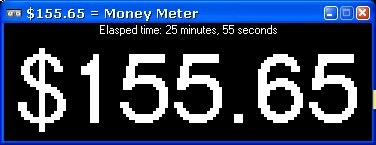
The main display shows the running cost of your meeting in real time. Resize the window and text to make a bold statement.
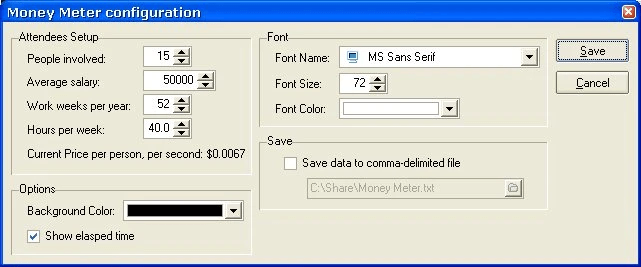
Configure the number of personnel, average salary, hours per week, and weeks per year to calculate accurate meeting costs.
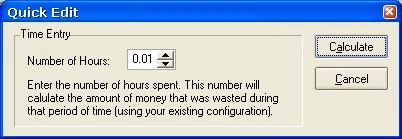
The Quick Edit feature lets you manually enter elapsed time if you forgot to start tracking at the beginning of the meeting.
Version History
Initial version.
Download Money Meter
 Download v1.00
You Might Also Like

A versatile command-line utility that formats system date and time for batch files, login scripts, and automation.
Learn More
Display how long your Windows system has been running in a customizable, borderless window with tray icon and Always On Top.
Learn MoreSupport Money Meter Development
Money Meter is completely free. If this tool has saved you time or helped put a number on the cost of unnecessary meetings, consider making a donation to help fund continued development and new features.
Support and Information
Find answers to common questions about Money Meter.
View FAQFound a bug or have a question? We are here to help.
Contact UsTo uninstall, simply delete the program folder. No registry entries or system files are left behind.
Download the latest version and extract over your existing folder, or to a new location. Settings are preserved.