


Can I use Mouse Move to prevent my screen saver from starting?
Yes, you can use Mouse Move to prevent your screen saver from starting. Lets explain a scenario:
Your corporation uses group policies to set the corporate screen saver to activate after 5 minutes of inactivity. For whatever reason you do not like the screen saver and do not appreciate coming back to your desk and having to re-login or deactivate the screensaver.
You can download and install our Mouse Move software and run this program. It will present you with a setup screen to configure the software.
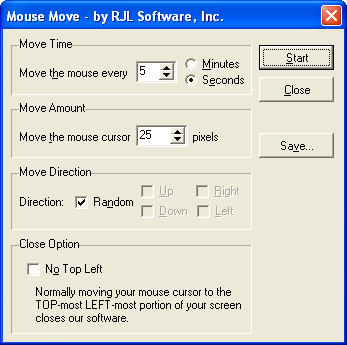
For the scenario above you would set Mouse Move to move the mouse cursor every 4 mintues. This would make Windows think there is activity on the system and never activate the screensaver.
Mouse Move runs hidden in the background of Windows, you will not know it is running or preventing the screensaver from starting. You can read how to close Mouse Move, because it is hidden and closing it is not obvious. If you like how Mouse Move and want to have it start everytime Windows starts you probably want to read up on that. If you like Mouse Move and what it does for you, you can read the instructions on how to remove the RJL logo that appears at startup and shutdown Mouse Move.
If you are looking for a more 'user friendly' application that tries to prevent your screen saver from starting, download our Stop Screen Saver tray icon application. This program sits in the Windows taskbar and continually asks Windows if the screensaver is about to start. Once Windows tries to start the screen saver Stop Screen Saver kicks in and prevents it from starting.
Your corporation uses group policies to set the corporate screen saver to activate after 5 minutes of inactivity. For whatever reason you do not like the screen saver and do not appreciate coming back to your desk and having to re-login or deactivate the screensaver.
You can download and install our Mouse Move software and run this program. It will present you with a setup screen to configure the software.
For the scenario above you would set Mouse Move to move the mouse cursor every 4 mintues. This would make Windows think there is activity on the system and never activate the screensaver.
Mouse Move runs hidden in the background of Windows, you will not know it is running or preventing the screensaver from starting. You can read how to close Mouse Move, because it is hidden and closing it is not obvious. If you like how Mouse Move and want to have it start everytime Windows starts you probably want to read up on that. If you like Mouse Move and what it does for you, you can read the instructions on how to remove the RJL logo that appears at startup and shutdown Mouse Move.
If you are looking for a more 'user friendly' application that tries to prevent your screen saver from starting, download our Stop Screen Saver tray icon application. This program sits in the Windows taskbar and continually asks Windows if the screensaver is about to start. Once Windows tries to start the screen saver Stop Screen Saver kicks in and prevents it from starting.
Support Our Work
Please consider making a contribution today to help us keep Mouse Move available for everyone.

Didn't find your answer?
Our support team can help you with your specific issue. Submit a request and we'll get back to you.
Get Help Now
Rating:  (16 votes)
(16 votes)
Additional Information
Added: Apr 2, 2007
Added: Apr 2, 2007