


My sound file does not play at the same time as my Splash Screen, why?
The order AutoRun Wizard runs its components is this:
Sound File - Splash Screen - Auto Launch File(s)
Depending on the option selected on the Option Tab, the sound file will either play until the autorun is complete or until the sound file has ended. You can use the timer option on the Splash Screen tab to show the screen for X seconds, syncing the sound with the splash screen could depend on the speed of the computer. Test your options with different timer intervals to see what works best for you.
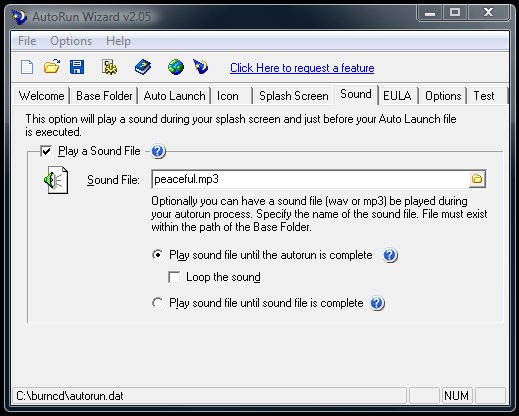
Also, make sure that your sound file is not too large. The larger the file, the more memory it will take to play this sound. If possible you should leave yourself a second or two after the sound has finished to close the Splash Screen.
Sound File - Splash Screen - Auto Launch File(s)
Depending on the option selected on the Option Tab, the sound file will either play until the autorun is complete or until the sound file has ended. You can use the timer option on the Splash Screen tab to show the screen for X seconds, syncing the sound with the splash screen could depend on the speed of the computer. Test your options with different timer intervals to see what works best for you.
Also, make sure that your sound file is not too large. The larger the file, the more memory it will take to play this sound. If possible you should leave yourself a second or two after the sound has finished to close the Splash Screen.
Support Our Work
Please consider making a contribution today to help us keep AutoRun Wizard available for everyone.

Didn't find your answer?
Our support team can help you with your specific issue. Submit a request and we'll get back to you.
Get Help Now
Rating:  (16 votes)
(16 votes)
Additional Information
Added: Jan 20, 2005 | Last Updated: Oct 18, 2013
Added: Jan 20, 2005 | Last Updated: Oct 18, 2013