


If I use AutoRun Wizard to launch a PowerPoint file, do my customers...
No, users of your CD are not required to install PowerPoint. You can download The PowerPoint 2003 viewer from Microsoft. This enables any customer to view your PowerPoint presentation. This application is free to distribute and can be added to your CD-ROM base folder.
Simply set the File to Autorun to pptview.exe and check the option to specify a Command Line. This command line should be set to "/s" which tells the PowerPoint 2003/2007 Viewer to automatically load the file. Then type in the path and filename of the power point file you wish to load.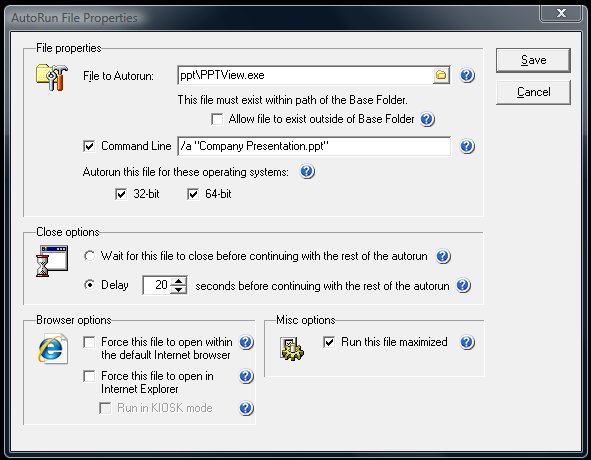
Simply set the File to Autorun to pptview.exe and check the option to specify a Command Line. This command line should be set to "/s" which tells the PowerPoint 2003/2007 Viewer to automatically load the file. Then type in the path and filename of the power point file you wish to load.
Below is a screenshot that shows loading the Power Point viewer application from a \ppv\ directory in a Base Folder. The /s command line loads the power point presentation automatically.
If you are using the old PowerPoint 97 viewer (ppview32.exe) the command line option is /a.
Support Our Work
Please consider making a contribution today to help us keep AutoRun Wizard available for everyone.

Didn't find your answer?
Our support team can help you with your specific issue. Submit a request and we'll get back to you.
Get Help Now
Rating:  (16 votes)
(16 votes)
Additional Information
Added: Jan 20, 2005 | Last Updated: Apr 7, 2025
Added: Jan 20, 2005 | Last Updated: Apr 7, 2025