


How can I resize all of my images at once?
With Resize JPEGs you can select an entire Directory to scan and resize every JPEG within that directory. Simply select the Directory option on the main screen, enter in the directory that contains the images you want to resize.
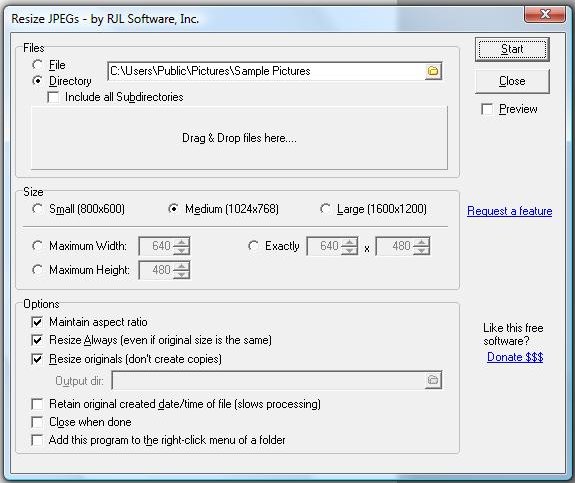
Resize JPEGs will scan for all of the JPEG files within that directory and resize them based on the settings you have selected.
You can also drag and drop a group of files into the "Drag and Drop" area. This will queue up those files to be resized based on your specifications.
Resize JPEGs will scan for all of the JPEG files within that directory and resize them based on the settings you have selected.
You can also drag and drop a group of files into the "Drag and Drop" area. This will queue up those files to be resized based on your specifications.
Support Our Work
Please consider making a contribution today to help us keep Resize JPEGs available for everyone.

Didn't find your answer?
Our support team can help you with your specific issue. Submit a request and we'll get back to you.
Get Help Now
Rating:  (16 votes)
(16 votes)
Additional Information
Added: Jun 23, 2008 | Last Updated: Jan 20, 2009
Added: Jun 23, 2008 | Last Updated: Jan 20, 2009